
8. Testing and Continuous Integration#
Reliable testing and Continuous Integration (CI) are foundational for ensuring software correctness, especially in collaborative and evolving research environments. This section outlines different types of tests, tools for writing and maintaining them, and how to integrate testing into automated workflows.
Why do testing and continuous integration matter?
Prevents regressions and errors as projects grow.
Encourages modular, maintainable code.
Enables safe collaboration through automated checks.
8.1. Types of Tests#
Tests differ mainly by their scope: how much of your code each one exercises at once. A healthy suite mixes several levels, since each catches different problems and gives feedback at a different speed.
Unit tests check a single unit (one function, method, or small component) in isolation to confirm it behaves as intended. They are small and fast, so you can run many of them constantly. For research code, this means testing the building blocks: a normalization function, a distance metric, or a data parser.
Integration tests check that several units work together correctly, focusing on the interactions and data passed between them rather than each piece alone. A typical example is one stage of an analysis pipeline: loading a file, transforming it, and writing the result.
End-to-end (system) tests run the complete, integrated workflow from input to output to verify it meets its requirements. For a research project this might run the whole analysis on a small fixed dataset and compare the final numbers or figures.
Regression tests lock in a previously fixed bug or a known-good result so it cannot silently break again. When you fix a bug, add a test that fails on the old behavior and passes on the new one; when an output is verified correct, save it as a reference to compare against later.
The test pyramid captures a useful balance: write many fast unit tests at the base, fewer integration tests in the middle, and fewer end-to-end tests at the top. Lower-level tests run quickly and pinpoint exactly where a failure is, while end-to-end tests are slower and only tell you that something, somewhere, broke.
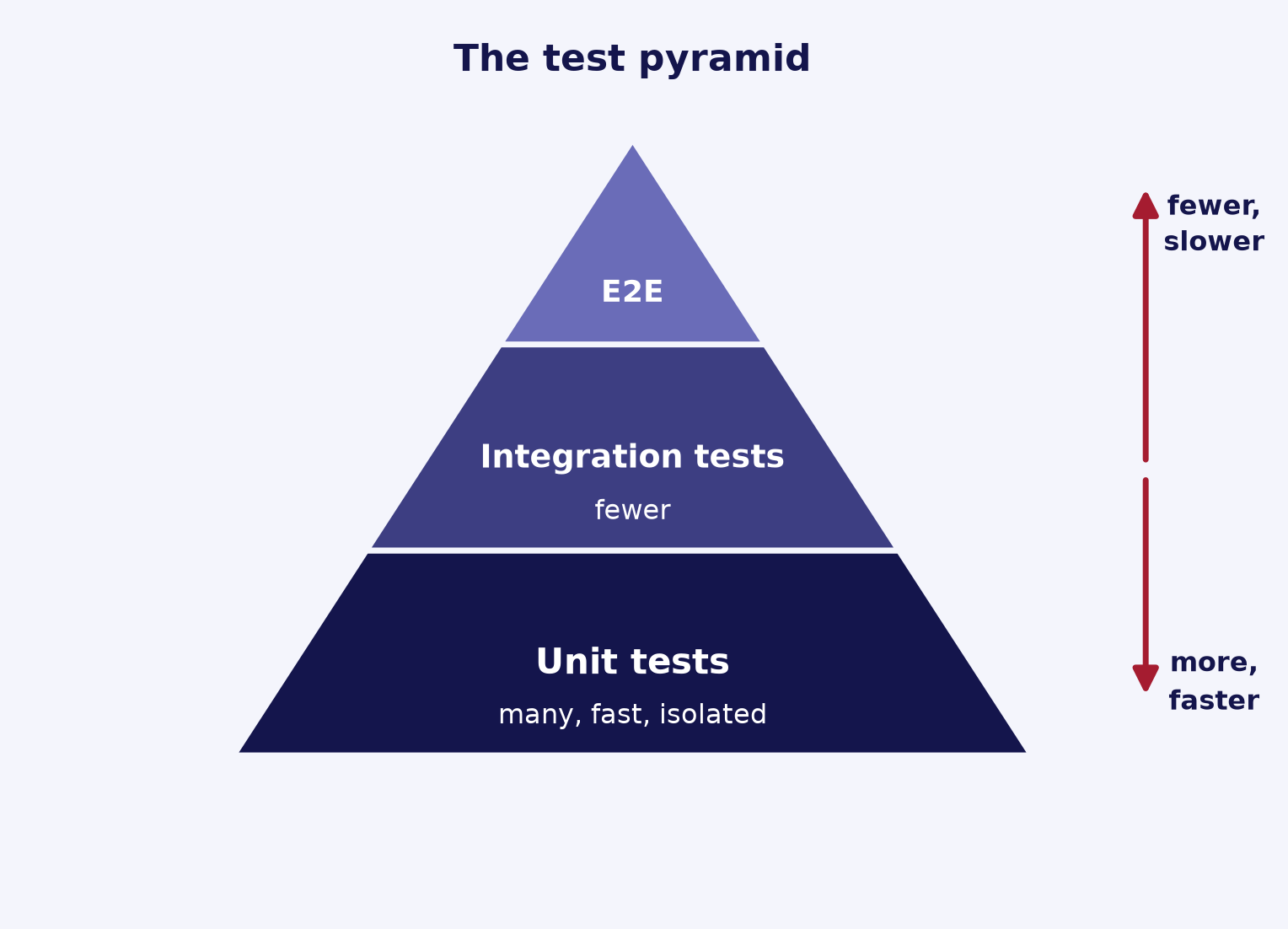
Fig. 8.1 The test pyramid: many fast unit tests at the base, fewer integration tests in the middle, and few end-to-end (E2E) tests at the top.#
A minimal unit test pairs a function with a test_ function that asserts the expected result:
# code under test
def normalize(values):
    total = sum(values)
    return [v / total for v in values]  # scale values to sum to 1

# unit test: checks this one function in isolation
def test_normalize():
    assert normalize([1, 1, 2]) == [0.25, 0.25, 0.5]
An integration test, by contrast, would call normalize as part of a larger pipeline (for example, load a file, normalize it, then write the result) and check the combined output.
Tip
When a test fails, lower-level tests make the cause easier to find. Push tests as far down the pyramid as you can, and reach for an integration or end-to-end test only when the behavior you care about genuinely spans multiple units.
For deeper background, see Martin Fowler on The Practical Test Pyramid and the Test Pyramid, the Wikipedia articles on unit testing, integration testing, system testing, and regression testing, and The Turing Way on code testing.
8.2. Testing Tools and Frameworks#
A small set of tools covers most research testing needs. The core choice is a test runner that finds and executes your tests; the rest help you write the tests themselves.
pytest is the most widely used Python testing framework. Tests are plain functions named
test_*that use Python’s built-inassert, and pytest reports rich, detailed output on failure (for example, the actual and expected values). Two features make it especially useful:Fixtures provide reusable setup (sample data, a temporary directory, a configured object). Define one with
@pytest.fixtureand a test receives it by listing its name as an argument.Parametrize runs one test over many input/expected pairs, so you cover several cases without duplicating code.
unittest is the standard library framework, so it needs no installation. Tests are methods on a class that subclasses
unittest.TestCase, using assertion methods such asassertEqualandassertRaises. pytest can also discover and rununittest-style tests.Mocking replaces a real dependency (a network call, a database, a slow model) with a stand-in so a test stays fast and deterministic.
unittest.mockprovidesMockobjects andpatchto swap out attributes during a test, while pytest’s built-inmonkeypatchfixture can set or delete attributes, dictionary items, and environment variables, then undo the change automatically afterward.Hypothesis adds property-based testing: instead of fixed examples, you state a property that should hold for all inputs in a range and Hypothesis generates many cases, including edge cases you might not think of. You describe inputs with strategies and apply them via the
@givendecorator.
A parametrized pytest test checks one function against several cases at once:
import pytest

def clip(x, lo, hi):
    return max(lo, min(x, hi))  # constrain x to the range [lo, hi]

@pytest.mark.parametrize("x,expected", [(-1, 0), (0, 0), (5, 5), (12, 10)])
def test_clip(x, expected):
    assert clip(x, 0, 10) == expected
Tip
Reach for parametrize whenever you find yourself copying a test and changing only the inputs. Each case is reported separately, so a failure points straight to the input that broke.
For details, see the pytest documentation, including fixtures, parametrize, and monkeypatch; the Python docs for unittest and unittest.mock; and the Hypothesis documentation.
8.3. Writing Effective Tests#
The value of a test depends on how it is written. Good tests are clear about what they check, focused on one thing, and trustworthy enough that a failure always means something is genuinely wrong. The habits below keep a suite readable and low-maintenance as your code grows.
Arrange-Act-Assert. Structure each test in three steps: Arrange the inputs and any setup, Act by calling the code under test once, then Assert on the result. Keeping these phases visually separate makes a test easy to read and pinpoints where it fails.
One behavior per test, with a descriptive name. A test should check a single behavior so that a failure has one clear cause. Name it for the behavior it verifies (for example,
test_normalize_scales_values_to_sum_to_one) so the report reads like a specification.Independent and deterministic. Tests should not share mutable state or depend on running in a particular order, so each can run alone or in parallel. They should also produce the same result every time: seed random number generators, inject fixed timestamps instead of reading the wall clock, and replace network or database calls with stand-ins (see mocking and monkeypatch).
Test edge cases and failure modes. Beyond the typical case, cover empty input, boundary values, and invalid arguments. Assert that errors are raised when they should be:
pytest.raisesis a context manager that passes only if the wrapped code raises the expected exception.Test behavior, not implementation. Check observable results through the public interface rather than internal details. Tests bound to implementation break on harmless refactors; tests bound to behavior keep passing as long as the contract holds.
import pytest

def normalize(values):
    total = sum(values)
    if total == 0:
        raise ValueError("cannot normalize values that sum to zero")
    return [v / total for v in values]  # scale values to sum to 1

def test_normalize_scales_values_to_sum_to_one():
    weights = [1, 1, 2]                  # Arrange
    result = normalize(weights)          # Act
    assert result == [0.25, 0.25, 0.5]  # Assert

def test_normalize_rejects_zero_sum():
    # the body must raise ValueError, or the test fails
    with pytest.raises(ValueError):
        normalize([0, 0])
Tip
A useful shorthand for these habits is FIRST: tests should be Fast, Independent, Repeatable, Self-validating (they assert pass or fail with no manual checking), and Timely (written close to the code they cover). Writing for testability also helps; see Software Design Principles.
For more, see Bill Wake on Arrange-Act-Assert, the pytest guide to asserting expected exceptions, the Google Testing Blog on testing behavior, not implementation, and the FIRST principles of unit testing.
8.4. Test Coverage#
Coverage measures how much of your code your tests actually run, which makes it a quick way to spot code that no test reaches. It is a guide for finding gaps, not a guarantee that the tests are any good.
Line vs. branch coverage. Line (statement) coverage reports whether each line executed at all. Branch coverage goes further: where a line can jump to more than one next line, such as an
if, it checks that every outcome was taken, so it flags a condition whoseelsepath was never tested. Branch coverage is stricter and usually the more informative of the two.Tools. coverage.py is the standard Python coverage tool. pytest-cov is the plugin that runs it through pytest, so coverage is collected as part of your normal test run.
Reading the report. The report lists each file with its covered percentage and the line numbers that never ran. Read it to find untested code that matters, such as an error handler or a rarely hit branch, rather than to admire the total.
Coverage measures execution, not correctness. A line counts as covered the moment it runs, even if no assertion checks the result, so a high percentage can hide weak tests. Martin Fowler argues coverage is useful for finding untested code but a poor target, since a mandated number is easy to reach with low-quality tests. Do not chase 100%: aim instead to cover the critical and error-handling paths well. See Test Coverage.
# run the test suite and measure coverage for your package
pytest --cov=mypackage
# add term-missing to list the line numbers that were never run
pytest --cov=mypackage --cov-report=term-missing
Tip
Enable branch coverage to catch untested conditional paths: pass --cov-branch to pytest-cov, or run coverage run --branch if you use coverage.py directly.
8.5. Continuous Integration (CI)#
Continuous Integration runs your checks automatically on every change, so problems surface early and the main branch stays releasable. Instead of remembering to run things by hand, you describe the work once and a service repeats it for every push and pull request.
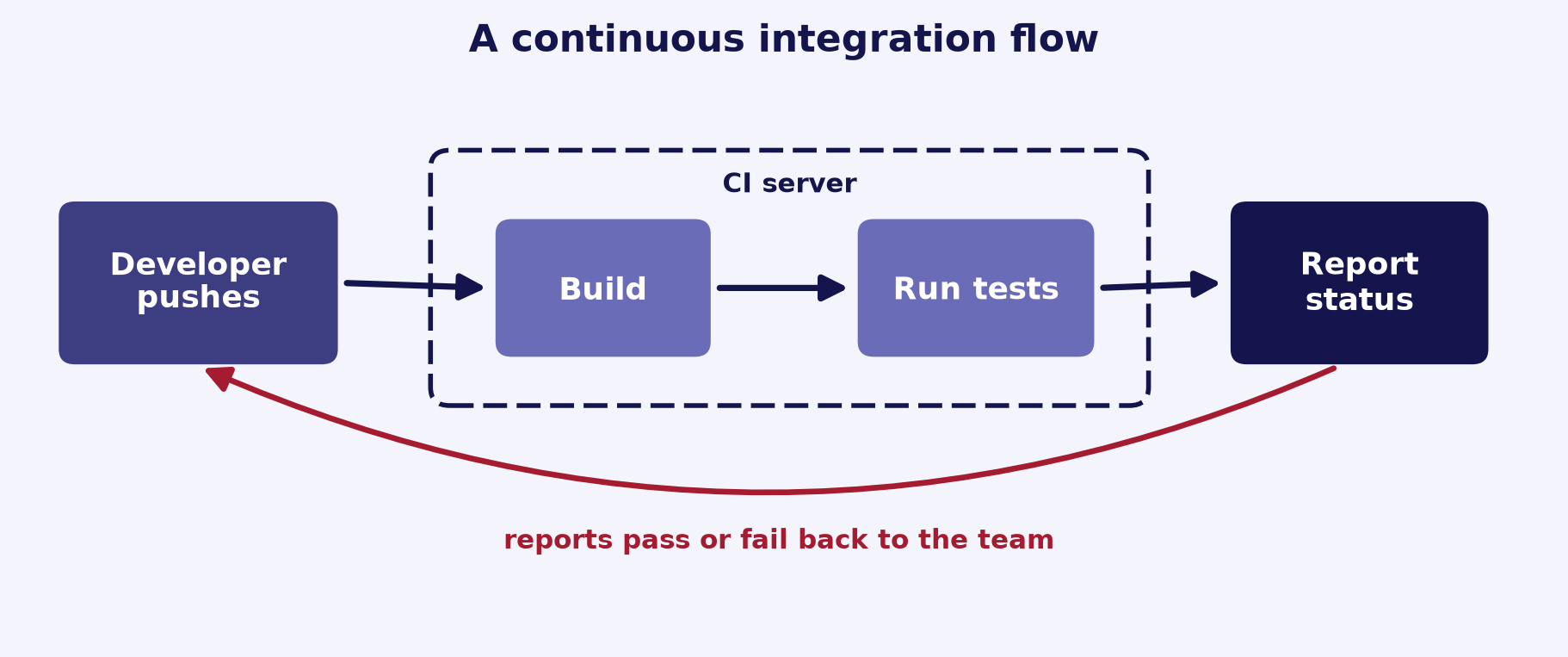
Fig. 8.2 A continuous integration flow: a developer’s check-in triggers the CI server to build and test the change, then reports status back to the team.#
What runs. On each push and pull request, CI checks out the code, installs dependencies, and runs the tests. You can add a linter or formatter check and report coverage in the same run.
GitHub Actions. A common choice on GitHub, configured by a workflow file under
.github/workflows/(for exampleci.yml). The file lists the events that trigger it, the runners to use, and the steps to run.Matrix testing. A
matrixstrategy runs the same job across several configurations, such as multiple Python versions and operating systems, to catch problems that appear only on a specific combination.Require CI to pass before merge. Configure branch protection on the default branch and mark the CI job as a required status check, so a pull request cannot merge until its checks succeed.
Cache dependencies. Caching the package manager’s downloads (for example pip) speeds up later runs by avoiding repeated installs. The
actions/setup-pythonaction enables this with a singlecachesetting.
A minimal workflow that tests across a small version matrix:
# .github/workflows/ci.yml
name: CI
on: [push, pull_request]   # run on every push and pull request

jobs:
  test:
    runs-on: ${{ matrix.os }}
    strategy:
      matrix:
        os: [ubuntu-latest]
        python-version: ["3.11", "3.12", "3.13"]
    steps:
      - uses: actions/checkout@v7        # get the repository contents
      - uses: actions/setup-python@v6     # install the chosen Python
        with:
          python-version: ${{ matrix.python-version }}
          cache: pip                      # cache pip downloads between runs
      - run: pip install -e ".[test]"     # install the package and test deps
      - run: pytest                       # run the test suite
Tip
Keep CI fast so people actually wait for it: cache dependencies, and run the quick checks (linting, unit tests) before slower ones. A run that takes minutes rather than tens of minutes is far more likely to be respected before merging.
For details, see the GitHub docs on building and testing Python, using a matrix for your jobs, and about protected branches, plus the actions/setup-python action. CI pairs naturally with code review; see Collaborative Code Development.
8.6. Research-Specific Advice#
Research code adds concerns that general testing advice does not stress: floating-point math, randomness, expensive computations, and code that changes as the science does. A few extra habits keep the tests meaningful in this setting.
Compare floats with a tolerance, not
==. Rounding makes exact equality fail for results of real arithmetic. For a single number, usepytest.approx, which compares within a relative tolerance of1e-6or an absolute tolerance of1e-12by default. For arrays, usenumpy.testing.assert_allclose, which defaults tortol=1e-7andatol=0; setatolexplicitly when expected values can be zero.Seed randomness and test the deterministic parts. Construct a generator with a fixed seed, for example
numpy.random.default_rng(seed), so stochastic code produces the same sequence every run. Then assert on properties that hold regardless of the draw (shape, range, a mean within bounds) rather than on exact random values. See Reproducible Research for more on seeds and determinism.Use small inputs with known or analytical answers. A tiny case whose result you can work out by hand, or derive analytically, is the most trustworthy oracle. It runs fast and pins down the exact expected number.
Regression-test pipeline outputs against saved references. For computations too large to verify by hand, save a known-good output once and compare future runs against it with a tolerance (see regression tests). This catches silent changes from a refactor or a dependency update.
Use property-based tests for invariants. Some properties must always hold: an output shape, values within a valid range, or a conserved quantity. Hypothesis generates many inputs, including edge cases, and checks the invariant for each.
Test data loading and preprocessing. Parsing, cleaning, and reshaping are a frequent source of silent errors that quietly corrupt every downstream result. Test these steps on small fixtures, including missing values and malformed rows.
import numpy as np
from numpy.testing import assert_allclose

def softmax(x):
    e = np.exp(x - np.max(x))  # subtract max for numerical stability
    return e / e.sum()

def test_softmax_matches_known_values():
    result = softmax(np.array([0.0, 0.0]))
    assert_allclose(result, [0.5, 0.5])   # tolerance-based, not ==
    assert_allclose(result.sum(), 1.0)    # probabilities sum to one
Tip
When you assert a result is close to zero, set atol explicitly: the default atol=0 in assert_allclose makes the relative tolerance alone govern the comparison, which is too strict near zero.
For details, see numpy.testing.assert_allclose, pytest.approx, numpy.random.default_rng, the Hypothesis documentation, and The Turing Way on code testing.
8.7. Summary Checklist#
All core functionality has unit tests
CI runs on pull requests
Linting and formatting checks automated
Code coverage tracked
Tests are reproducible and deterministic