
10. Reproducible Research#
Reproducibility ensures that research findings can be independently verified and built upon. This section presents core principles and practical strategies for making research code, data, and workflows reproducible.
Why does reproducibility matter?
Essential for scientific integrity and validation.
Enables collaboration and reuse across projects and labs.
Required by many journals, conferences, and funding agencies.
10.1. Key Principles of Reproducible Code#
Reproducibility means that the same analysis steps run on the same data reliably produce the same result, whether by a collaborator or by your future self. It is worth distinguishing reproducible from replicable: per The Turing Way, a result is reproducible when the same data and the same code give the same answer, while it is replicable when the same analysis applied to different data gives a qualitatively similar answer. This chapter focuses on reproducibility, which is the practical foundation everything else builds on.
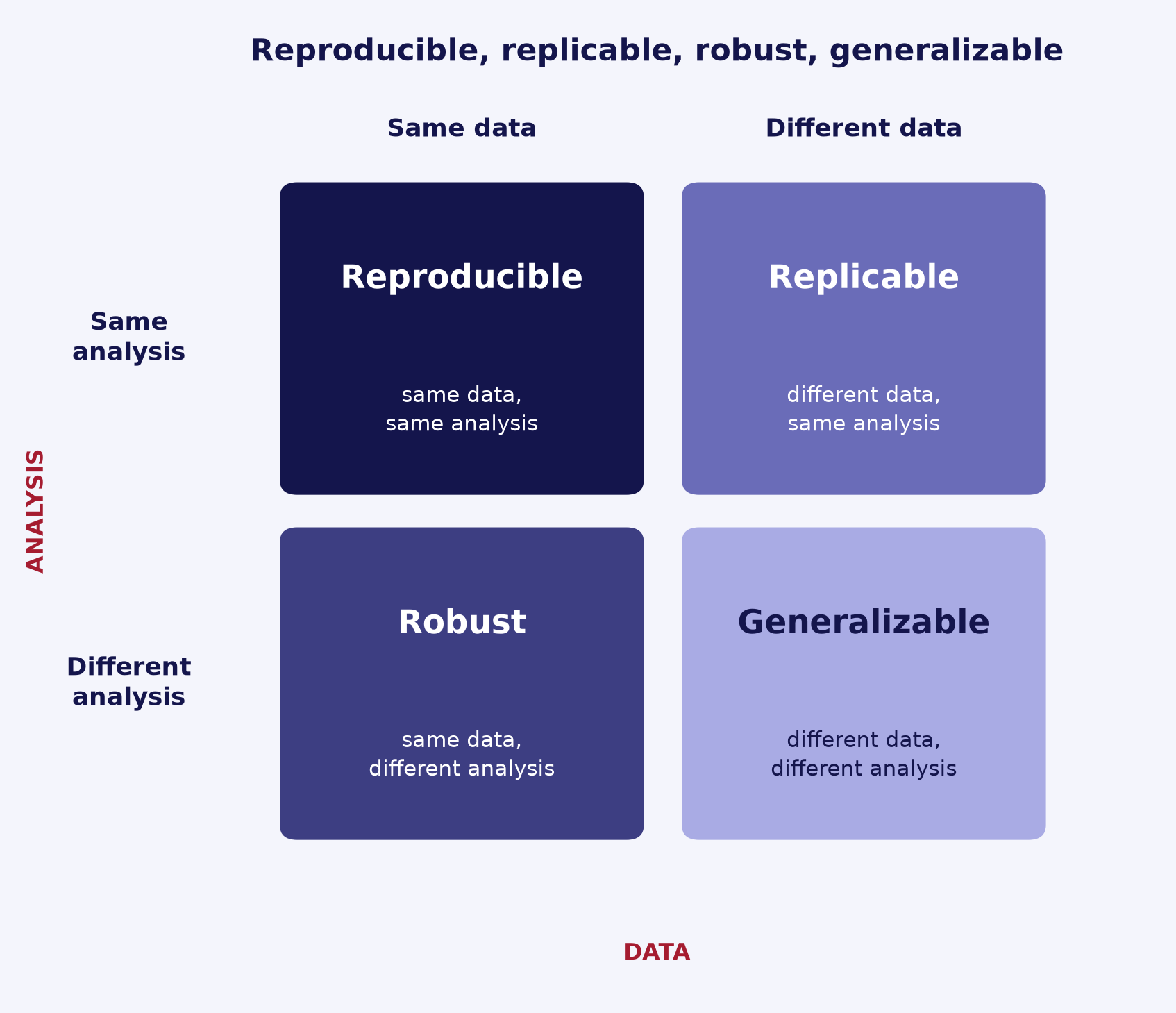
Fig. 10.1 Reproducible, replicable, robust, and generalizable results, distinguished by whether the data and the analysis are the same or different. (Adapted from The Turing Way.)#
A handful of principles make code reproducible. The rest of this chapter expands each one in detail.
Version control code and configuration. Track every script, notebook, and config file in version control so any result can be traced to an exact revision.
Capture the computational environment. Pin dependencies and isolate them in a virtual environment or container so the code runs the same way elsewhere.
Control randomness with seeds. Set and record random seeds for any stochastic step so runs are deterministic.
Make the workflow runnable end to end. Automate the path from raw inputs to final outputs so the whole pipeline reproduces with a single command.
Track data and its provenance. Record which dataset, version, and preprocessing produced each input, since code alone does not reproduce a result without the same data.
Record what produced each result. Log the code revision, parameters, environment, and inputs behind every figure, table, or model.
A useful test of the end-to-end principle is whether one command regenerates everything from scratch. A small Makefile expresses the dependency chain from raw data to results, and is supported across platforms:
# Regenerate everything with: make all
all: results/figure.png

data/clean.csv: data/raw.csv scripts/clean.py
	python scripts/clean.py data/raw.csv data/clean.csv

results/figure.png: data/clean.csv scripts/analyze.py
	python scripts/analyze.py data/clean.csv results/figure.png

clean:
	rm -f data/clean.csv results/figure.png
A plain run.sh works too when a dependency graph is overkill:
#!/usr/bin/env bash
set -euo pipefail              # stop on the first error
python scripts/clean.py data/raw.csv data/clean.csv
python scripts/analyze.py data/clean.csv results/figure.png
Tip
If you cannot yet reproduce a result with a single command, that gap is usually the highest-value thing to fix first.
For broader background, see The Turing Way guide to reproducible research and the ACM artifact review and badging definitions. The principles here connect to good software practices generally, covered in Software Design Principles.
10.2. Environment Reproducibility#
Code only reproduces if it runs in the same software environment. This section makes the capture the computational environment principle concrete: record what your code depends on so it behaves the same on a collaborator’s laptop, a cluster, or your future self’s machine. The options below form a fidelity spectrum, from pinning packages to capturing the whole operating system.
Pin exact versions and commit a lock file. Do not record loose ranges; pin to specific versions so installs are repeatable. With pip,
pip freezecaptures the currently installed versions, or use a resolver such as pip-tools or uv to produce a true lock file. With conda,conda env exportwrites the full environment to a file. Commit the result alongside your code.Isolate dependencies in a virtual environment. Install pinned dependencies into a per-project environment (a
venvor a conda environment) rather than system-wide, so projects do not interfere and the environment can be rebuilt from scratch.Capture the full environment with a container. A lock file pins your language packages, but containers reproduce the whole system, including the operating system and system libraries. Docker is the general-purpose option; Apptainer (formerly Singularity) is common on HPC clusters because it runs containers without root privileges.
Record the Python and key library versions. Note the interpreter version (for example in your README or lock file) along with the versions of core libraries, since the same code can give different results under a different Python or library release.
A minimal pip workflow, capturing the current environment and rebuilding it elsewhere:
# Capture: write installed package versions to a file (commit this)
pip freeze > requirements.txt

# Reproduce: fresh virtual environment, then install the pinned set
python -m venv .venv && source .venv/bin/activate
pip install -r requirements.txt
The conda equivalent records the channels and packages in one file:
conda env export > environment.yml   # capture (commit this)
conda env create -f environment.yml  # reproduce
Tip
A lock file pins your language dependencies, but only a container also pins the operating system and system libraries. Reach for a container when system-level details (compilers, CUDA, system packages) affect your results.
For depth, see The Turing Way on reproducible environments and the pip and conda environment docs. Day-to-day dependency and environment management is covered in Package Development.
10.3. Data Versioning and Management#
A result depends on its data as much as its code, so data must be tracked with the same care. This section makes the track data and its provenance principle concrete: version data alongside code so any output can be traced to the exact inputs that produced it.
Keep raw data immutable and separate from derived data. Treat source data as read-only and never edit it in place; write cleaned or processed data to a separate location so the original is always recoverable.
Do not commit large data to Git. Git is built for text and handles large or binary files poorly: it bloats history, slows clones, is hard to purge after the fact, and hosts impose file-size limits (for example, 100 MB on GitHub).
Version large or binary data with a dedicated tool. DVC and Git LFS keep large files out of Git history while still versioning them.
Link each data version to a code commit with DVC.
dvc addrecords the data’s content hash in a small.dvcpointer file and adds the data itself to.gitignore. You commit the pointer to Git, so checking out a commit selects the matching data version, whiledvc pushstores the actual bytes in remote storage (for example, S3 or a shared directory).Verify data integrity with checksums. Record a hash (DVC uses MD5 internally) so you can confirm a file has not been altered or corrupted in transit.
Record data provenance. Note each dataset’s source, version, license, and the preprocessing steps that produced any derived files, since the same code on different data gives a different result.
A minimal DVC workflow tracks a file, commits its pointer to Git, and pushes the data to a remote:
# Track the data: creates data/raw.csv.dvc and adds raw.csv to data/.gitignore
dvc add data/raw.csv

# Commit the small pointer file and the .gitignore rule (not the data itself)
git add data/raw.csv.dvc data/.gitignore
git commit -m "Track raw dataset with DVC"

# Upload the data bytes to the configured remote storage
dvc push
Git LFS is an alternative that keeps the familiar Git workflow, replacing tracked files with pointers and storing the contents on a remote:
git lfs track "*.h5"   # records the pattern in .gitattributes
git add .gitattributes
Tip
Decide what is raw versus derived early, and regenerate derived data from raw with your pipeline rather than versioning every intermediate file. Version raw inputs and final outputs; rebuild the rest.
For depth, see the DVC data versioning guide, the Git LFS documentation, and The Turing Way on version control for data.
10.4. Randomness and Seeds#
Stochastic steps such as random sampling, weight initialization, data shuffling, and dropout make results vary from run to run unless you control the random number generators (RNGs). This section makes the control randomness with seeds principle concrete: seed every RNG you use so a stochastic run repeats.
Seed every RNG you actually use. A single library’s seed does not cover the others. If your code uses Python’s
random, NumPy, and a framework such as PyTorch, seed each one.Prefer explicit local generators over global state. A local generator (NumPy
default_rng(seed)or atorch.Generator) carries its own state, so its stream is not perturbed by unrelated library calls and is easy to pass around and reason about.Watch non-obvious sources of nondeterminism. The
PYTHONHASHSEEDenvironment variable randomizesstr/byteshashing and therefore the iteration order of sets and dicts; set it to a fixed integer for stable ordering. Multi-threading and multi-processing reorder work, and some GPU operations (certain CUDA and cuDNN kernels, for example) are not deterministic by default.Enable deterministic algorithms when exact reproducibility matters. In PyTorch,
torch.use_deterministic_algorithms(True)(withtorch.backends.cudnn.deterministic = Trueandtorch.backends.cudnn.benchmark = False) opts into deterministic kernels. This can be slower, and even then PyTorch notes that results are not guaranteed to match across releases, platforms, or between CPU and GPU.Record the seed with the results. Log the seed alongside outputs (see record what produced each result) so a run can be reproduced later.
import random
import numpy as np

SEED = 42
random.seed(SEED)                 # Python's built-in random
rng = np.random.default_rng(SEED)  # local NumPy generator (preferred)
x = rng.random(3)                  # draw from the local generator, not np.random.*

# If you use PyTorch, also seed it (covers CPU and CUDA):
# import torch
# torch.manual_seed(SEED)
# torch.use_deterministic_algorithms(True)  # optional: exact, but slower
Note
Seeding makes a run repeatable on the same setup, but it is not a guarantee of identical results across different hardware, library versions, or CPU versus GPU. Treat the seed as one recorded input, not a substitute for pinning your environment.
For the exact APIs and caveats, see the NumPy default_rng reference, the Python random docs, PYTHONHASHSEED, and the PyTorch reproducibility note. Recording the seed connects to capturing your full environment, covered in Environment Reproducibility.
10.5. Documentation of Experiments#
To reproduce or interpret a result months later, you need to recover everything that produced it. This section makes the record what produced each result principle concrete: capture the full set of inputs behind every run, and keep a record of what you tried and why.
Capture every input to a run. Record the parameters and configuration, the code revision (a Git commit hash), the computational environment, the data version, and the random seed. Any one of these can change a result, so all of them belong in the record.
Externalize configuration into a config file. Move parameters out of the code and into a config file (for example YAML or JSON) so the run is fully described by its config, not by edited source. The same script then reproduces a run by reading the same config.
Save a per-run record. Write the resolved config, the commit hash, and the seed into a per-run output directory, or use an experiment tracker. MLflow and Weights & Biases both log parameters, metrics, and artifacts per run, and record the code version (the Git commit).
Keep a project README or lab notebook. Maintain a running note of what was tried, what worked, and why, so the reasoning behind a result is recoverable, not just its numbers. The Turing Way frames this as recording the provenance of a project.
A minimal config-driven pattern: read a YAML config, then save the resolved config, commit, and seed into the run’s output folder.
# config.yaml: the run is described entirely by this file
seed: 42
learning_rate: 0.001
epochs: 20
data_version: v3
import subprocess, shutil, json, yaml
from pathlib import Path

cfg = yaml.safe_load(open("config.yaml"))           # all parameters come from the config
commit = subprocess.check_output(                   # the exact code revision
    ["git", "rev-parse", "HEAD"], text=True).strip()

out = Path("runs") / commit[:8]                      # one folder per run
out.mkdir(parents=True, exist_ok=True)
shutil.copy("config.yaml", out / "config.yaml")      # save the resolved config
(out / "run_meta.json").write_text(                  # plus commit and seed
    json.dumps({"commit": commit, "seed": cfg["seed"]}, indent=2))
Tip
A quick test: given only a run’s output folder, could you rerun it? If the config, commit, and seed are saved alongside the outputs, the answer is yes.
For depth, see The Turing Way on research data management and the MLflow Tracking and Weights & Biases docs. Writing clear configs and notes connects to good project documentation, covered in Documentation and Readability.
10.6. Testing Reproducibility#
Reproducibility is a claim, not an assumption: a pipeline is only reproducible once you have re-run it and confirmed the outputs match. The principles above make a result likely to reproduce; the checks below confirm that it actually does.
Re-run and compare, first on the same machine. Run the pipeline twice from the same inputs and seeds and confirm the outputs agree. This catches uncontrolled randomness and accidental dependence on leftover state or cached files.
Then re-run in a clean environment or on a different machine. Rebuild the environment from your lock file in a fresh virtual environment or container, or run on a collaborator’s machine. A result that reproduces only on your laptop usually hides an undeclared dependency: an unpinned package, a local data file, or a hard-coded path.
Add a regression test against a saved reference. Save a known-good output once, then have a test re-run the pipeline and compare against it. Such a test (Michael Feathers’ characterization test) pins current behavior so an unintended change is flagged on sight.
Compare floating-point results with a tolerance, not exact equality. Numerical output rarely matches bit-for-bit across runs, platforms, or library versions, so compare within a tolerance using
numpy.testing.assert_allcloseorpytest.approx.Run the pipeline end to end in CI. Exercise the whole workflow on a small input on every change so reproducibility is checked continuously rather than rediscovered months later. The mechanics of writing tests and configuring CI are covered in Testing and Continuous Integration.
A minimal regression test runs the pipeline on a fixed input and compares to a saved reference within a tolerance:
import numpy as np

def test_pipeline_matches_reference():
    result = run_pipeline("tests/data/small_input.csv")  # the function or pipeline under test
    reference = np.load("tests/data/expected_output.npy")  # saved known-good output
    # Pass if |result - reference| <= atol + rtol * |reference|; relax tolerances as needed
    np.testing.assert_allclose(result, reference, rtol=1e-6, atol=0)
Tip
When you change behavior on purpose, the regression test will fail because the saved reference is now stale. Inspect the diff, confirm the new output is correct, then regenerate the reference and commit it as a deliberate update.
For depth, see numpy.testing.assert_allclose, pytest.approx, the characterization test definition, and The Turing Way on testing and continuous integration.
10.7. Output and Artifact Management#
Research produces artifacts: trained models, figures, tables, processed datasets, and logs. These are derived outputs, regenerated from code plus data, so managing them deliberately keeps results traceable and the repository clean.
Treat artifacts as regenerable derived outputs, not source. An artifact is the product of code, data, and configuration, so it should be reproduced by rerunning the pipeline rather than hand-edited. The code, data, and config are the source of truth; the artifact is not.
Keep generated files out of Git. Git is built for source text, not large or binary outputs, so list generated files in
.gitignorerather than committing them. Store large artifacts (model checkpoints, large processed datasets) with a data-versioning tool or object storage, the same way you handle data: see Data Versioning and Management. DVC versions models and other large outputs with the samedvc addanddvc pushworkflow used for inputs.Organize outputs in a dedicated directory, one folder per run. Keep generated outputs separate from source code and raw data, as The Turing Way recommends separating project-generated files from read-only and human-generated ones. A per-run subfolder keeps each run’s artifacts together and prevents one run from overwriting another.
Attach metadata to each artifact. Record what produced it: the config, the code commit, the data version, and the seed. Saving this next to the artifact, or in an experiment tracker, makes the result traceable: see Documentation of Experiments.
Name or version artifacts so versions are distinguishable. The Turing Way on file naming advises machine-readable names (no spaces, consistent delimiters) and a version number or an ISO 8601 date (
YYYY-MM-DD) so files sort in order and different versions stay distinct.
Ignore a whole outputs directory with a single trailing-slash pattern (per the gitignore docs, a trailing / matches only directories):
# .gitignore: ignore generated outputs, but keep the folder's README
outputs/
!outputs/README.md
Save each artifact next to a small metadata sidecar so it stays self-describing:
outputs/2026-06-18_run-a1b2c3d/
├── model.pt          # the artifact
└── model.meta.json   # {"commit": "a1b2c3d", "data_version": "v3", "seed": 42}
Tip
A useful check: given only an artifact and its sidecar, could you regenerate it? If the commit, data version, and seed are recorded alongside it, the answer is yes.
For depth, see The Turing Way on research compendia and file naming, the DVC get-started guide, and the gitignore documentation.
10.8. Sharing and Archiving#
Sharing makes your work reusable by others; archiving makes it permanent and citable. This is where the rest of the chapter pays off: code and data that reproduce a result become an artifact that another researcher, including your future self, can find, cite, and build on.
Publish code in a public repository under a clear license. Put the code on a public host such as GitHub, and add a license file so others know how they may reuse it; without one, default copyright leaves reuse rights unclear.
Archive a tagged release for a persistent DOI. A repository URL can move or disappear, so deposit a fixed release to a long-term archive that mints a DOI. Zenodo integrates with GitHub: once you enable a public repository and create a GitHub release, Zenodo archives that release and issues a new DOI for it (and a concept DOI that always resolves to the latest version). The mechanics of making a release citable are covered in Package Development.
Deposit data in an appropriate repository. Archive datasets where they get a DOI and persistent landing page, rather than as repository attachments. General-purpose options include Zenodo, Figshare, Dryad, and Dataverse; a domain-specific repository is often preferable when one exists. Use the re3data registry to find a suitable one. This extends Data Versioning and Management from your working copy to the published record.
Follow the FAIR principles. Aim to make outputs Findable, Accessible, Interoperable, and Reusable: a persistent identifier and good metadata make work findable and accessible, open formats keep it interoperable, and a clear license plus documentation make it reusable.
Bundle a research compendium. Package code, data, and documentation together so the whole project reproduces as a unit. The Turing Way describes such a compendium: a conventional folder layout, a clear separation of data from analysis from outputs, and a specified environment. Archive the compendium for a DOI and cite that DOI in the paper. A
CITATION.cfffile tells others how to cite it; see Documentation and Readability.
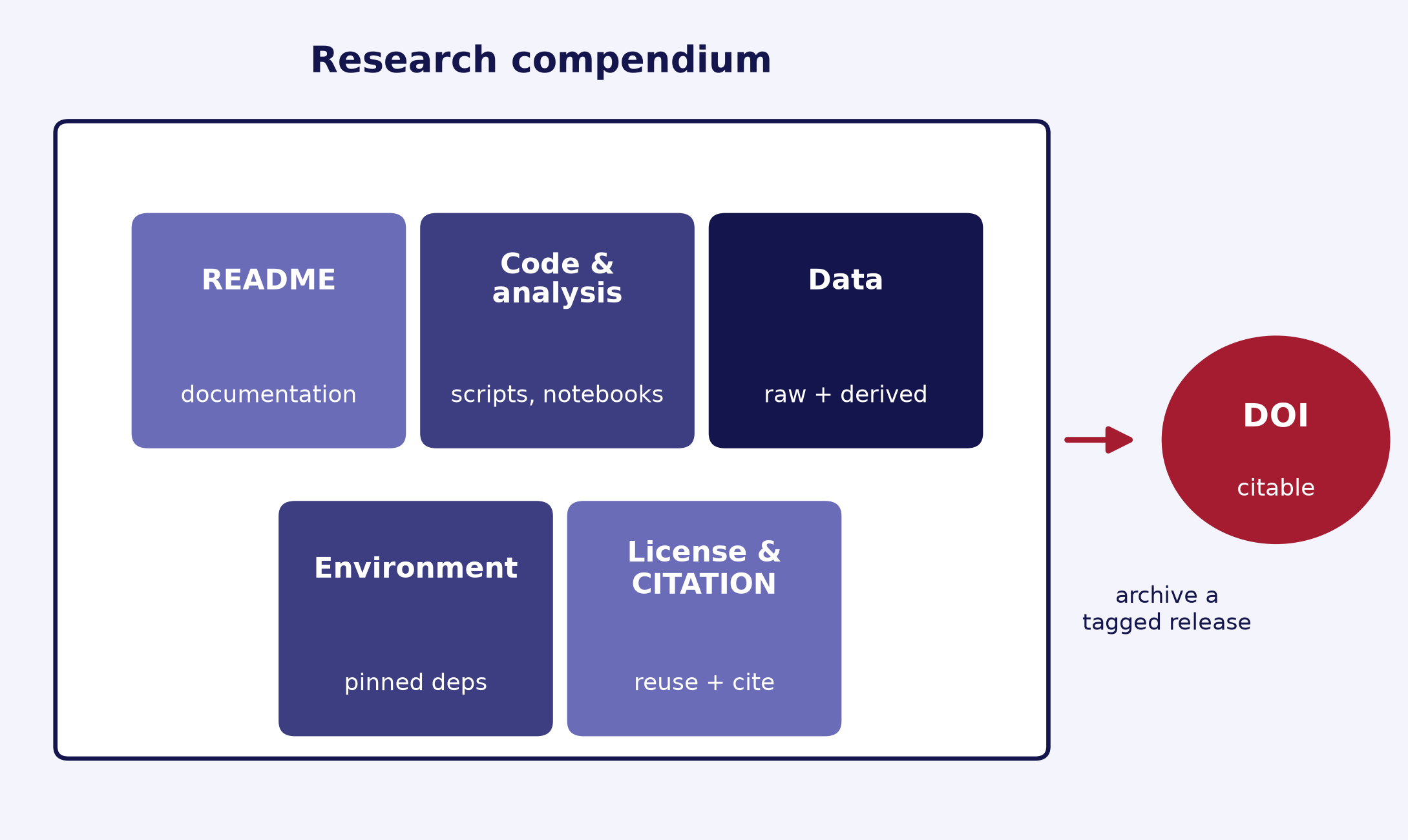
Fig. 10.2 A research compendium bundles code, data, and documentation into a single archivable, citable unit. (Adapted from The Turing Way.)#
A research compendium gathers the pieces this chapter built, in a conventional layout:
my-project/
├── README.md             # what this is and how to run it
├── LICENSE               # reuse terms (required to clarify rights)
├── CITATION.cff          # how to cite this work
├── environment.yml       # the pinned computational environment
├── data/                 # raw (immutable) and derived data, or pointers to it
├── analysis/             # scripts and notebooks
└── outputs/              # generated figures, tables, models
The high-level path from a GitHub repository to a citable archive:
1. Make the repository public and add a LICENSE.
2. In Zenodo, sign in with GitHub and enable archiving for the repository.
3. Create a tagged release on GitHub (for example, v1.0.0).
4. Zenodo archives that release and mints a DOI; cite the DOI in your paper.
Tip
Archive the exact version behind a paper, not just the latest code: cite the DOI of the specific release you used so a reader lands on the same snapshot that produced your results.
For depth, see The Turing Way on open source software, sharing and archiving data, and research compendia, the GitHub guide to referencing and citing content, and the FAIR principles.
10.9. Summary Checklist#
All code is under version control
Dependencies are pinned and documented
Random seeds are set
Environment is isolated (virtual env or container)
Data and config files are versioned
Instructions exist to reproduce full pipeline
Outputs (models, figures) are archived with metadata