
7. Documentation and Readability#
This section focuses on best practices and tools that improve documentation and code clarity in research software.
Why does documentation matter?
Clear documentation ensures reproducibility, collaboration, and long-term usability.
Readable code is easier to debug, extend, and validate, which is critical for research integrity.
7.1. Types of Documentation#
Documentation is not a single thing: different types serve different reader needs, and matching the type to the need is what keeps docs useful. A widely used way to organize these needs is the Diátaxis framework, which separates documentation into four kinds:
Tutorials (learning-oriented): lessons that take a newcomer through a hands-on experience to build basic competence.
How-to guides (task-oriented): practical, step-by-step directions that help an already-competent user accomplish a specific goal.
Reference (information-oriented): accurate, lookup-friendly descriptions of the machinery, such as APIs, parameters, and configuration.
Explanation (understanding-oriented): background and discussion that clarifies concepts and answers “why” questions.
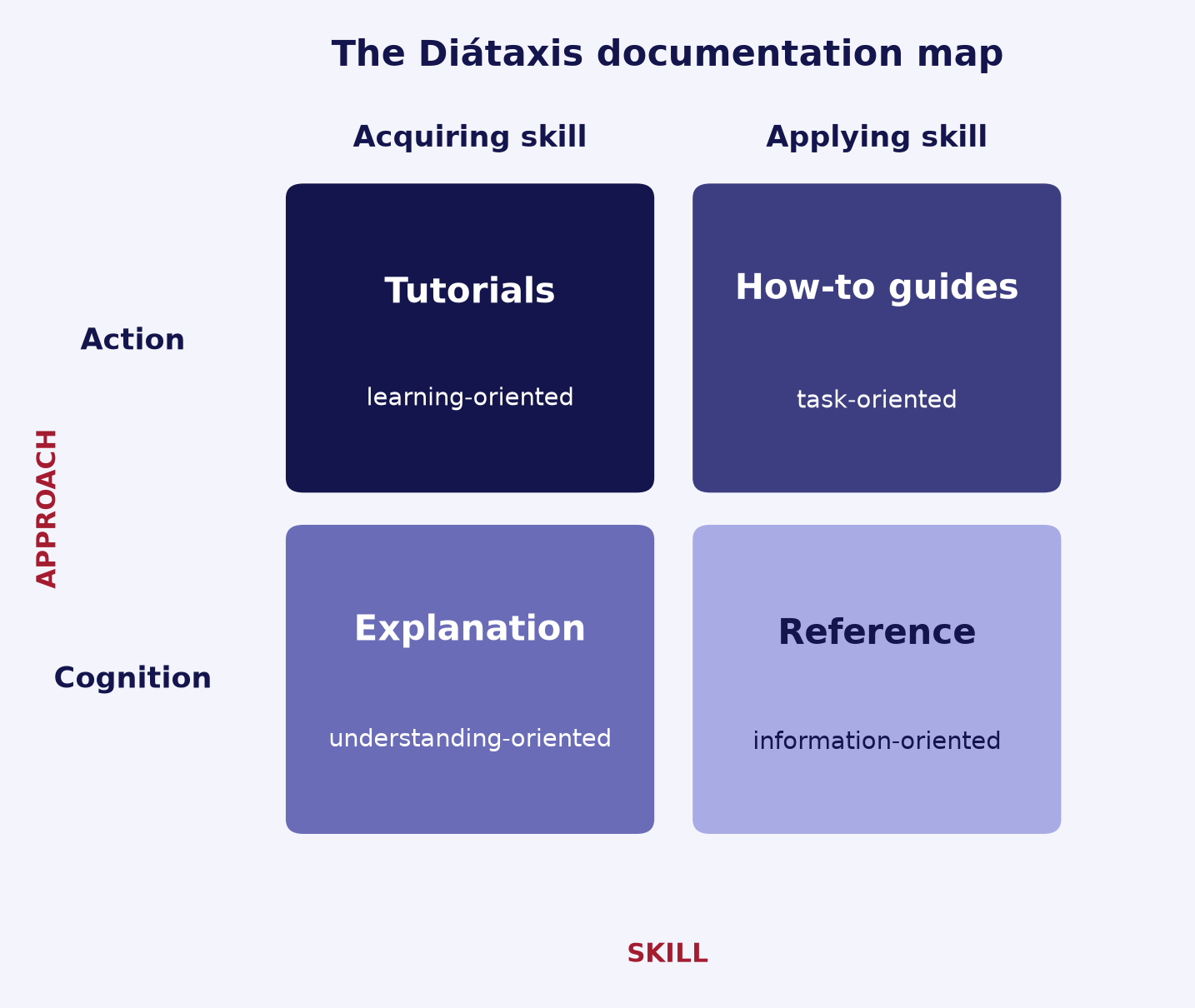
Fig. 7.1 The Diátaxis map organizes the four documentation types along two axes: action versus cognition, and acquiring versus applying skill. (Adapted from Diátaxis.)#
Most research projects do not need all four as separate manuals, but they usually combine a few concrete artifacts:
README (the front door): the first file a reader opens. It should state what the project is, how to install it, and a minimal usage example, then point to anything deeper.
Docstrings and API reference: per PEP 257, a docstring is a string literal placed as the first statement in a module, function, class, or method. Docstrings on public functions and classes are the source of reference documentation and are accessible at runtime via
__doc__.Inline comments: explain why, not what. The code already shows what it does; comments should capture intent, assumptions, and non-obvious reasoning.
Runnable examples and tutorials: small scripts or notebooks a reader can execute to see the project work end to end.
A minimal README outline that covers the essentials:
# Project Name
One-sentence description of what it does and why.

## Installation
How to set up the environment and install dependencies.

## Usage
A minimal, runnable example.

## License / Citation
How to reuse and how to cite.
Tip
Keep the README short and link out for depth. For broader guidance on documenting research software, see The Turing Way and Write the Docs.
7.2. Code Readability Best Practices#
Readable code is documentation in itself: it lowers the cost of every later read, debug, and change. As PEP 8 notes, code is read far more often than it is written, and the Zen of Python puts it plainly: “Readability counts.”
Use meaningful, descriptive names. Names should reveal intent so the reader does not have to decode them. Avoid ambiguous abbreviations and single-letter names except for short-lived loop counters.
Follow a consistent style guide. For Python, PEP 8 is the common baseline:
snake_casefor functions and variables,UPPER_CASEfor constants, and lines limited to 79 characters (teams may agree to extend to 99). Consistency within a project matters more than any single rule.Keep functions small and focused. A function should do one thing. The Google Python Style Guide suggests reconsidering a function once it grows past roughly 40 lines, since smaller functions are easier to read, test, and reuse.
Reduce deep nesting with guard clauses. “Flat is better than nested” (Zen of Python). Return early on invalid or edge cases so the main logic stays at a shallow indentation level.
Let comments explain why, not what. The code already shows what it does; comments should capture intent and non-obvious reasoning. See Types of Documentation for the role of inline comments.
A small refactor that applies clear names plus an early-return guard clause:
# Before: cryptic names and deep nesting
def p(d):
    if d:
        if d > 0:
            return d * 0.9  # what is 0.9?
    return None

# After: descriptive names and a guard clause
DISCOUNT_RATE = 0.9  # 10% loyalty discount

def apply_discount(price):
    if price is None or price <= 0:
        return None
    return price * DISCOUNT_RATE
Tip
You do not have to apply a style guide by hand. Automated formatters and linters can enforce these conventions for you; they are covered in the next section.
7.3. Tools and Practices#
A small toolchain turns the docstrings described in Types of Documentation into browsable, searchable documentation, and keeps the examples inside them honest as the code changes.
Pick a docstring style and stay consistent. PEP 257 defines what a docstring is and the basic one-line and multi-line conventions, but not how to lay out arguments and return values. The two common structured styles are Google style and NumPy style. Either works; the goal is to use one consistently across a project.
Generate docs from docstrings. Sphinx builds documentation directly from your code: the autodoc extension pulls in docstrings, and the napoleon extension lets autodoc understand Google- and NumPy-style docstrings. If your project documents in Markdown, MkDocs with the mkdocstrings plugin does the same job.
Test the examples with doctest. Python’s doctest module finds
>>>examples in docstrings, runs them, and checks the output against what you wrote, so examples cannot silently drift out of date.Add type hints as checked interface documentation. PEP 484 annotations record the expected argument and return types in a form that a static checker can verify, documenting the interface without separate prose. Note that these are not enforced at runtime.
Host the built docs. Read the Docs builds and hosts Sphinx or MkDocs sites automatically from your Git repository, rebuilding on each push so the published docs track the code.
A NumPy-style docstring with type hints and an embedded doctest:
def normalize(values: list[float]) -> list[float]:
    """Scale values so they sum to 1.

    Parameters
    ----------
    values : list[float]
        Non-empty list of non-negative numbers.

    Returns
    -------
    list[float]
        The input values divided by their total.

    Examples
    --------
    >>> normalize([1.0, 1.0, 2.0])
    [0.25, 0.25, 0.5]
    """
    total = sum(values)
    return [v / total for v in values]
# Run the embedded examples; no output means every example passed.
python -m doctest example.py
Tip
Keeping a >>> example in the docstring means the same snippet documents the function and serves as a regression test. Writing readable code in the first place (see Code Readability Best Practices) makes that documentation shorter and clearer.
7.4. Documentation in Research Context#
Research code carries documentation needs beyond general software: the documentation must let others, and your future self, understand the work, reproduce a result, and cite it correctly.
Document methods, parameters, and assumptions. Record the method, the parameter values and ranges, random seeds, software versions, and any assumptions a result depends on, so the result can be regenerated rather than guessed at. This is the heart of reproducibility; for the full treatment see the Reproducible Research chapter.
Document the data. Ship a dataset README or a data dictionary (also called a codebook) that lists each variable with its meaning, units, allowed values, and provenance. The Turing Way calls a data dictionary one of the most important pieces of documentation in a study. At a high level, aim for FAIR data: Findable, Accessible, Interoperable, and Reusable.
Make the work citable. Add a
CITATION.cfffile to the repository root. It is a small YAML file that tools can read, and GitHub uses it to add a “Cite this repository” link and to offer APA and BibTeX citations (see GitHub’s about-citation-files). To get a citable, versioned DOI, archive a release with a service such as Zenodo, then record that DOI in the file.
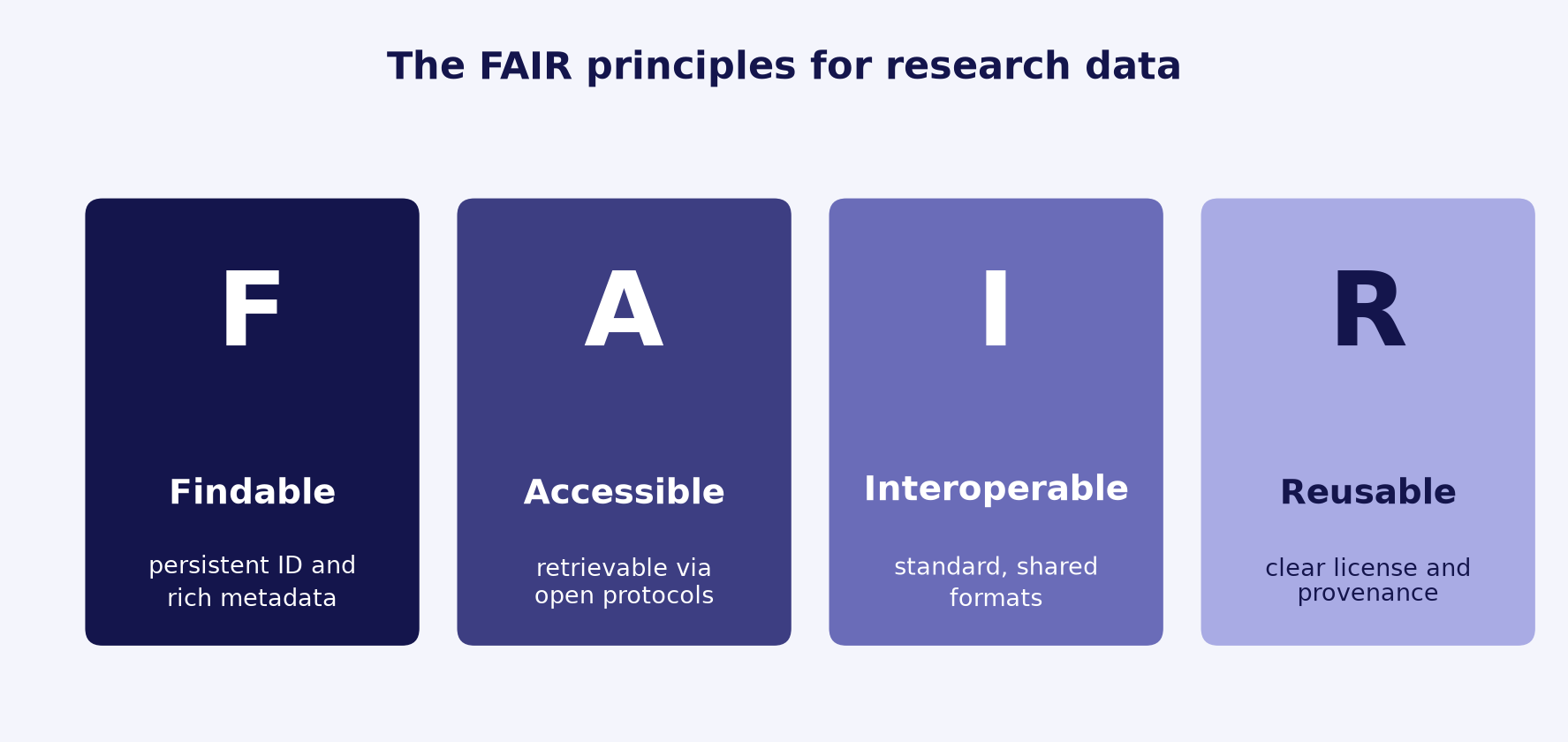
Fig. 7.2 The FAIR guiding principles for research data: Findable, Accessible, Interoperable, and Reusable.#
A minimal, valid CITATION.cff:
cff-version: 1.2.0
message: "If you use this software, please cite it as below."
title: "Example Analysis Toolkit"
authors:
  - family-names: Smith
    given-names: Jane
version: 1.0.0
doi: 10.5281/zenodo.1234567   # DOI for the archived release
Tip
Update the version and doi each time you archive a new release, so a citation points to the exact version that produced a result.
7.5. Mental Models for Readers#
As someone reads your code or docs, they build a mental model of how it works: an internal picture of the moving parts and how they fit together. Your job is to help them build an accurate one quickly. Clear code and docs do this for you; surprising or unexplained code forces the reader to reverse-engineer your intent.
Beware the curse of knowledge. The curse of knowledge is the bias that, once you know something, you assume others share that context. What is obvious to you as the author is not obvious to a newcomer or to your future self, so write for a reader who lacks your background and spell out the assumptions you take for granted.
Follow the principle of least astonishment. A component should behave the way most readers expect, so names and behavior should match conventions and hold no hidden surprises. A function named like a pure lookup should not quietly write a file or mutate its input. See Code Readability Best Practices for naming that reveals intent.
Use progressive disclosure. Progressive disclosure means leading with the few most important things and deferring the rest. Put the common case and a high-level overview first, and push details, options, and edge cases lower so a reader is not flooded before they have the big picture.
Lead with the why. Before the mechanics, give a short conceptual overview of what the code is for and why it exists. This is the explanation type from Types of Documentation, and it is the context a reader needs to interpret everything that follows.
A name that matches behavior keeps the reader’s mental model accurate:
# Astonishing: the name implies a read-only lookup, but it mutates input
def get_user(users, index):
    users.sort()           # surprising side effect hidden behind a "get"
    return users[index]

# Unsurprising: the name matches what the function actually does
def find_user(users, index):
    return users[index]    # pure lookup, no side effects
Tip
A quick check: skim your README or module top-down and ask whether a reader who has never seen the project would, after the first few lines, know what it does and why. If not, add a short overview before the details.
7.6. Summary Checklist#
Docstrings on all public functions/classes
README explains purpose, usage, and setup
Style guide followed consistently
Notebook outputs cleared before commit
All dependencies documented